Optimizing the Critical Rendering Path
Introduction
Before a page becomes visible, the browser has to process HTML, CSS, JavaScript, and other resources through a series of steps known as the Critical Rendering Path (CRP).
At a high level:
HTML → DOM → CSSOM → Render Tree → Layout → Paint → Composite → Pixels
If you're unfamiliar with these steps, I covered them in detail in Understanding Critical Rendering Path. Knowing how the browser renders a page is only the first part, though. The more practical question is:
How can we make this process faster?
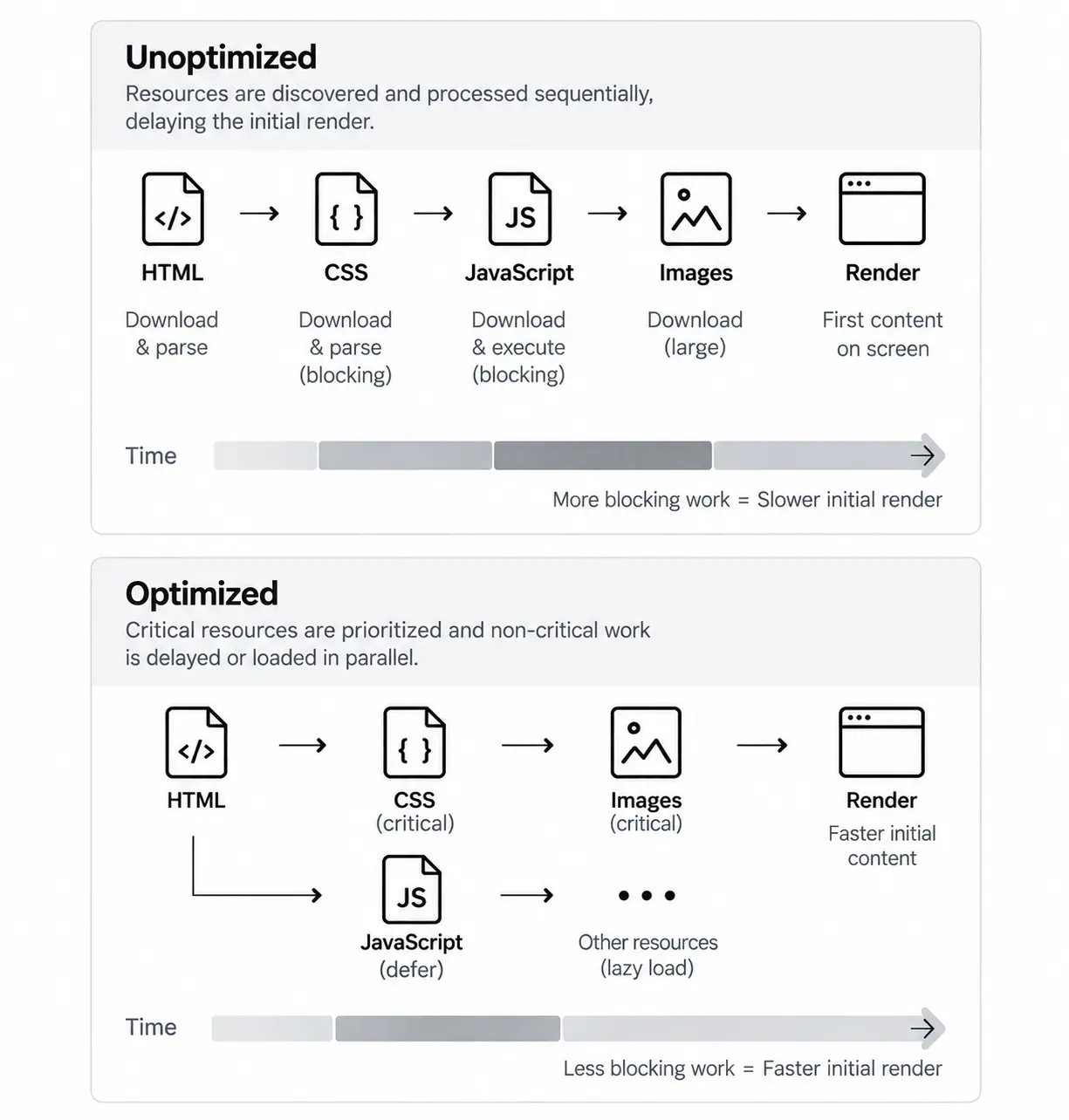
Every render-blocking stylesheet, parser-blocking script, large asset, or resource discovered too late can delay what the user sees. Optimizing the Critical Rendering Path isn't about making everything load immediately. It's about prioritizing what's needed for the initial render and delaying work that can safely happen later.
We'll start by measuring the page, identifying what's getting in the browser's way, and then work through practical ways to improve it.
Start With Measurement
When a page feels slow, it's tempting to immediately start adding async, defer, preload, lazy loading, or other optimizations.
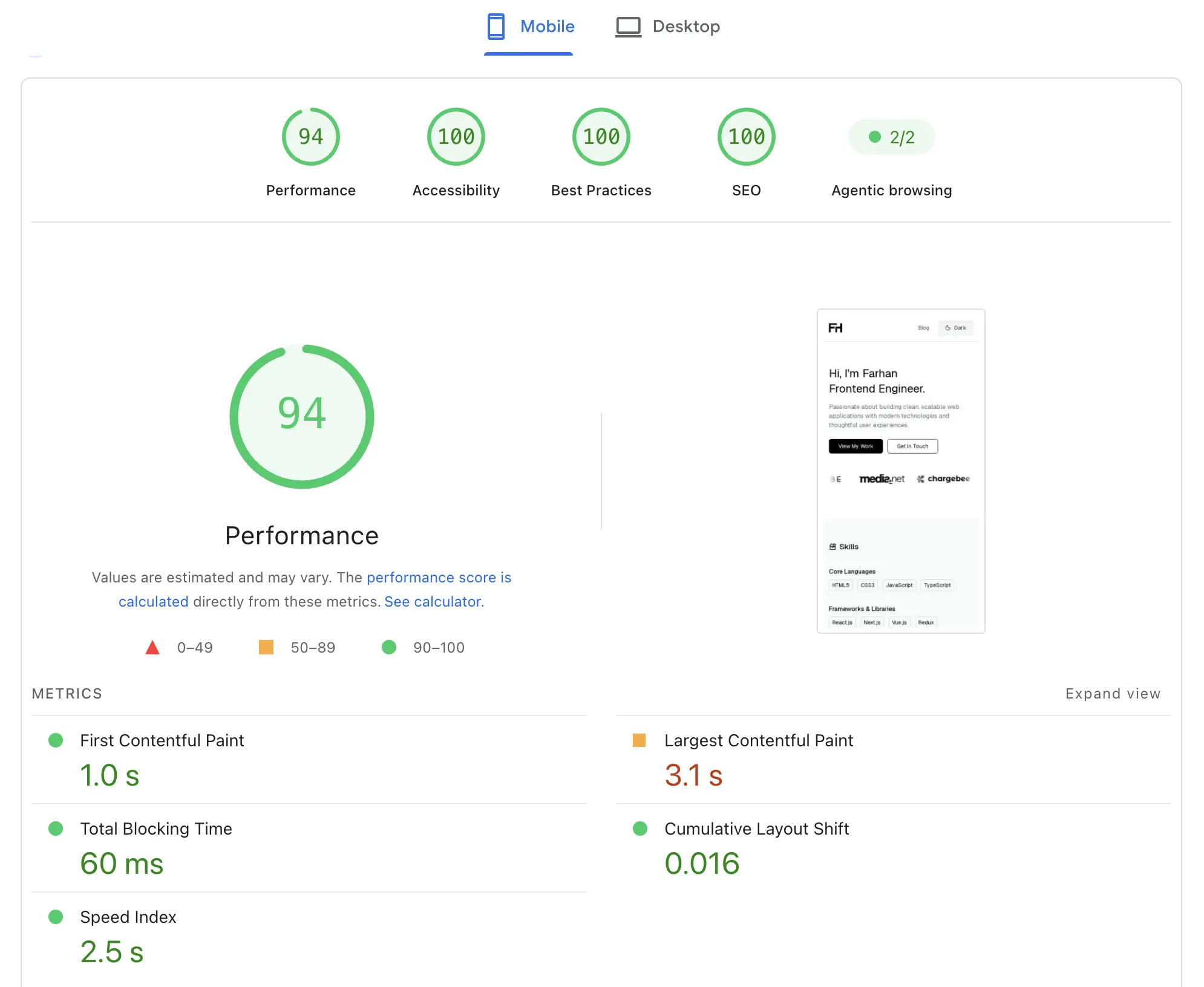
But without measurement, we're mostly guessing. Before changing anything, establish a baseline. One of the easiest ways to start is with PageSpeed Insights.
Enter the URL of the page you want to analyze and run the test. The report provides performance metrics along with diagnostics and opportunities that can help identify expensive parts of the loading process. Don't focus only on the overall performance score.
Instead, ask questions such as:
- How quickly does the first content appear?
- How long does the largest visible element take to render?
- Are resources delaying the initial render?
- Are large images being downloaded unnecessarily?
- Is too much JavaScript being shipped during the initial load?
Metrics such as First Contentful Paint (FCP) and Largest Contentful Paint (LCP) can give us an indication of how quickly content reaches the screen.
But these metrics tell us what happened. To optimize the page, we need to understand why it happened.
Reduce Render-Blocking CSS
CSS is required to build the CSSOM, and external stylesheets can block rendering while they're downloaded and parsed. Keeping the CSS required for the initial render minimal can help the browser display content sooner.
A few ways to reduce render-blocking CSS:
- Remove unused CSS — Avoid shipping styles that aren't needed by the page.
- Minify CSS — Reduce the amount of CSS the browser needs to download.
- Inline critical CSS — Include essential above-the-fold styles directly in the document when appropriate.
- Split non-critical styles — Keep styles that aren't required for the initial viewport away from the critical path.
Be selective with inlining. Too much inline CSS increases the HTML size and reduces the caching benefits of external stylesheets.
The goal is simple: load the styles needed for the initial render first and avoid making the browser wait for everything else.
Load JavaScript Without Unnecessarily Blocking Parsing
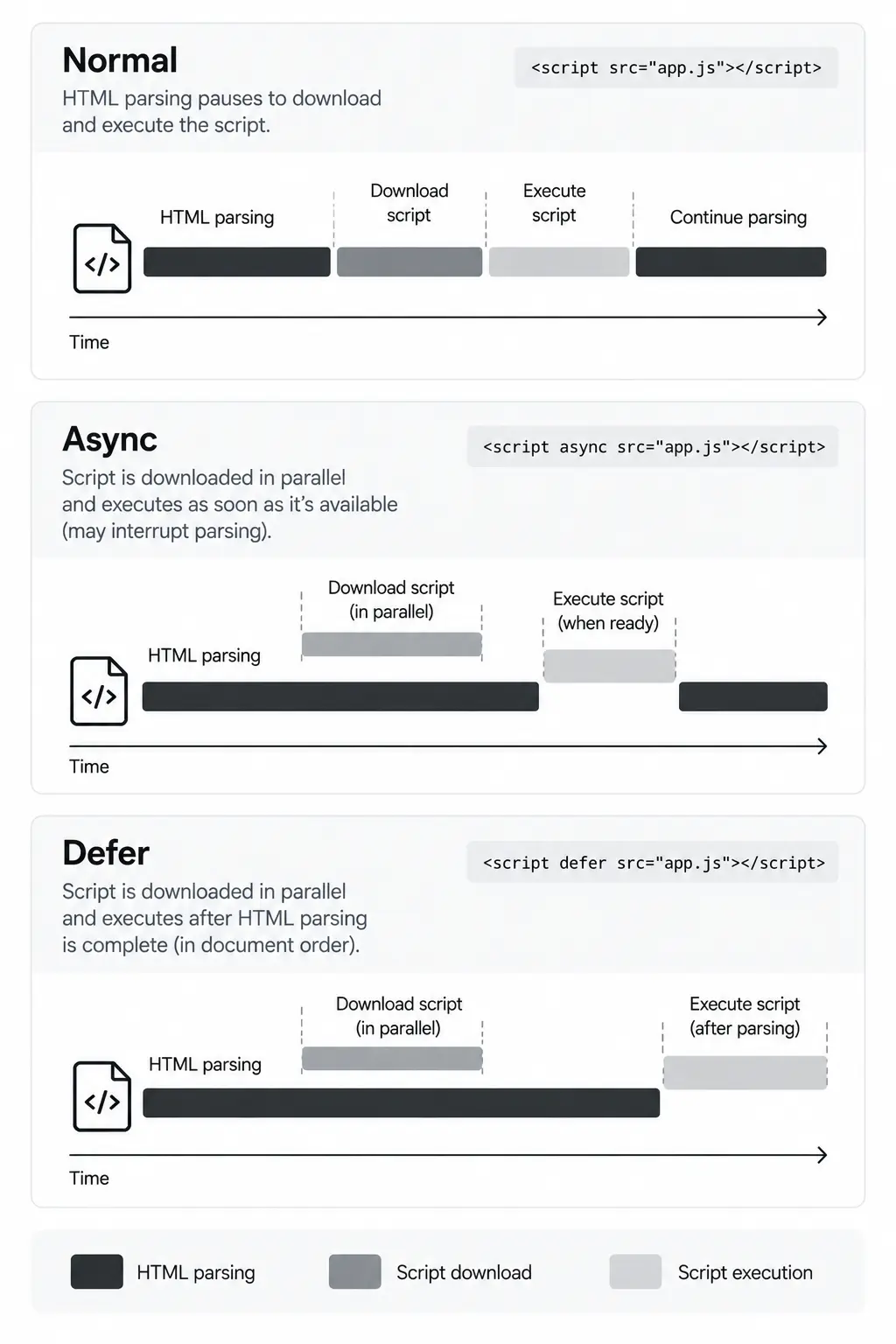
Not every script needs to execute as soon as the browser discovers it. For external classic scripts, async and defer can help prevent unnecessary blocking of HTML parsing.
With async, the script downloads in parallel with HTML parsing and executes as soon as it's available. This works well for independent scripts, such as analytics, that don't depend on execution order.
<script async src="/analytics.js"></script>
With defer, the script also downloads in parallel but waits until HTML parsing is complete before executing. Deferred scripts also preserve their document order.
<script defer src="/app.js"></script>
A simple way to remember the difference:
async → Download in parallel, execute when ready.defer → Download in parallel, execute after HTML parsing.
The goal isn't to add async or defer everywhere. It's to avoid letting JavaScript interrupt HTML parsing when it doesn't need to.
Help the Browser Discover Important Resources Earlier
Sometimes an important resource is discovered too late. Resource hints can help the browser prepare for or fetch these resources earlier.
preconnectEstablishes an early connection to an important third-party origin.
<link rel="preconnect" href="https://fonts.example.com" />
Resolves a domain name ahead of time, reducing some of the connection work later.
<link rel="dns-prefetch" href="//example.com" />
Fetches a resource that's important for the current page but might otherwise be discovered late.
<link
  rel="preload"
  href="/fonts/geist.woff2"
  as="font"
  type="font/woff2"
  crossorigin
/>
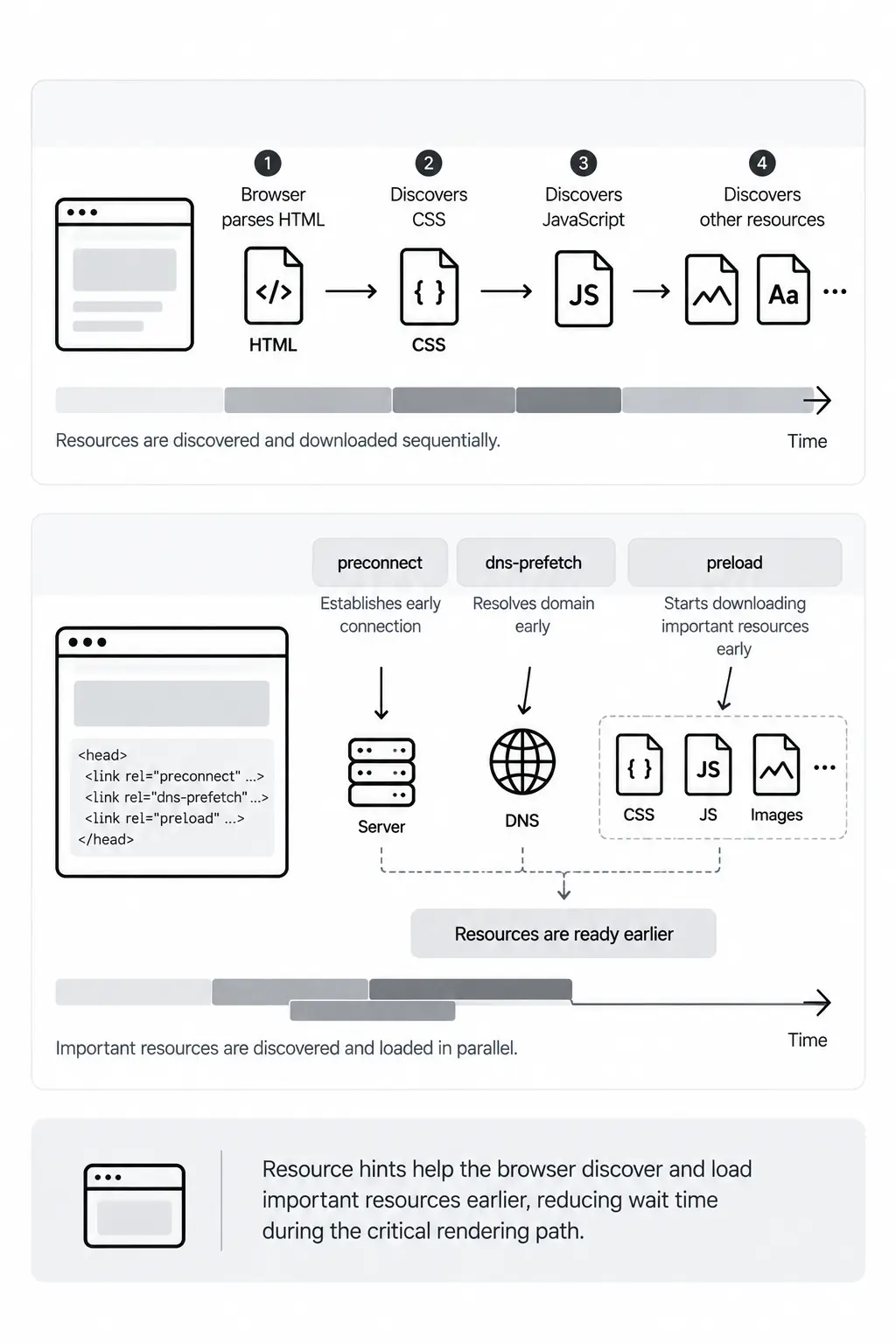
Resource hints should be used selectively. Preloading too many resources can make them compete for bandwidth with resources that are actually critical.
Delay Resources the User Doesn't Need Yet
Resources outside the initial viewport don't always need to be downloaded immediately.
Native lazy loading lets the browser defer offscreen images and iframes until they're closer to the viewport.
<img
  src="/crp-diagram.webp"
  alt="Critical Rendering Path diagram"
  loading="lazy"
/>

<iframe
  src="https://example.com/embed"
  loading="lazy"
></iframe>
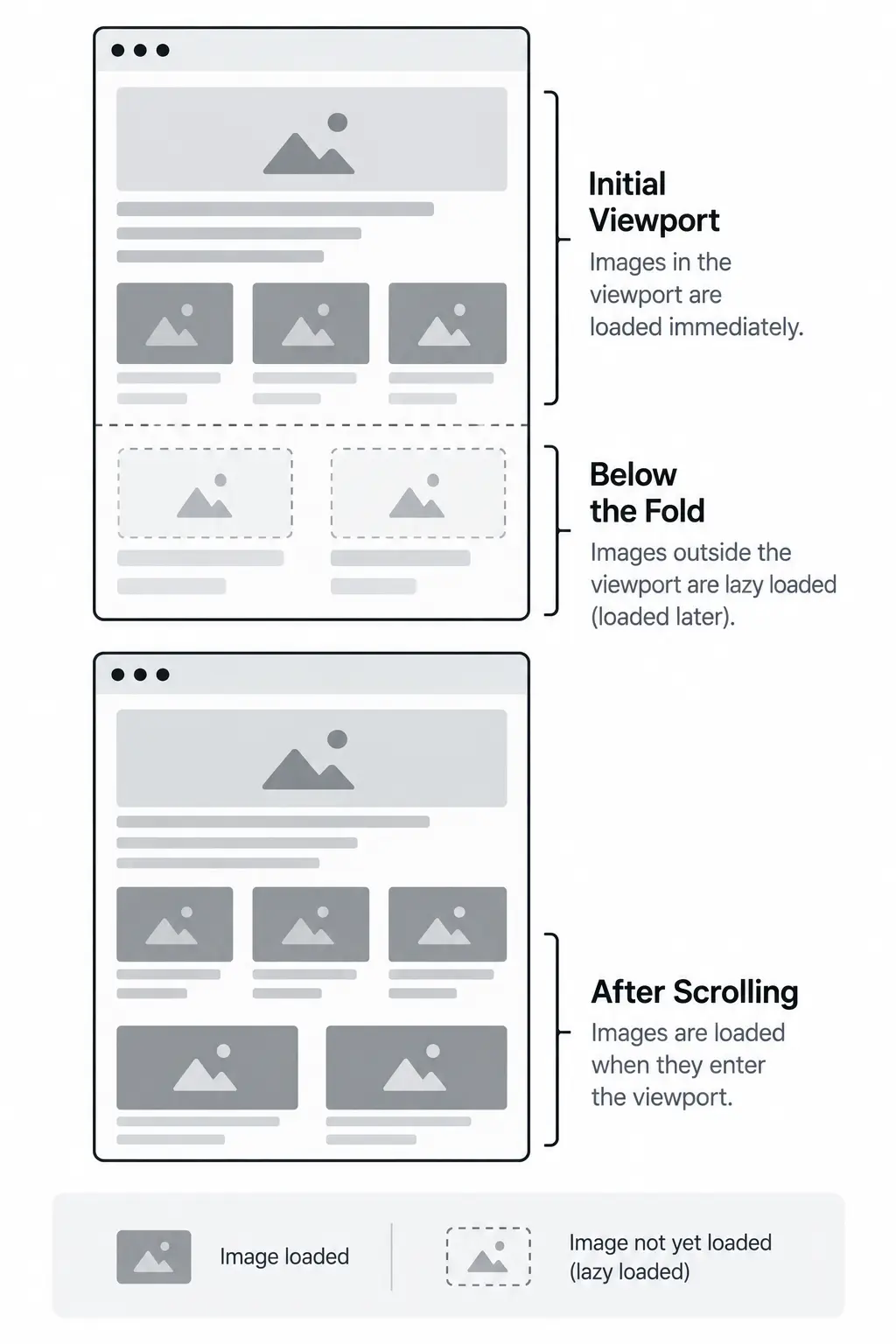
However, avoid lazy-loading resources that are critical to the initial viewport. In particular, lazy-loading an image responsible for Largest Contentful Paint (LCP) can delay its loading and hurt performance.
Think of lazy loading as a way to move non-critical resources out of the initial loading window, rather than something to apply to every image.
Reduce the JavaScript Required for the Initial Page
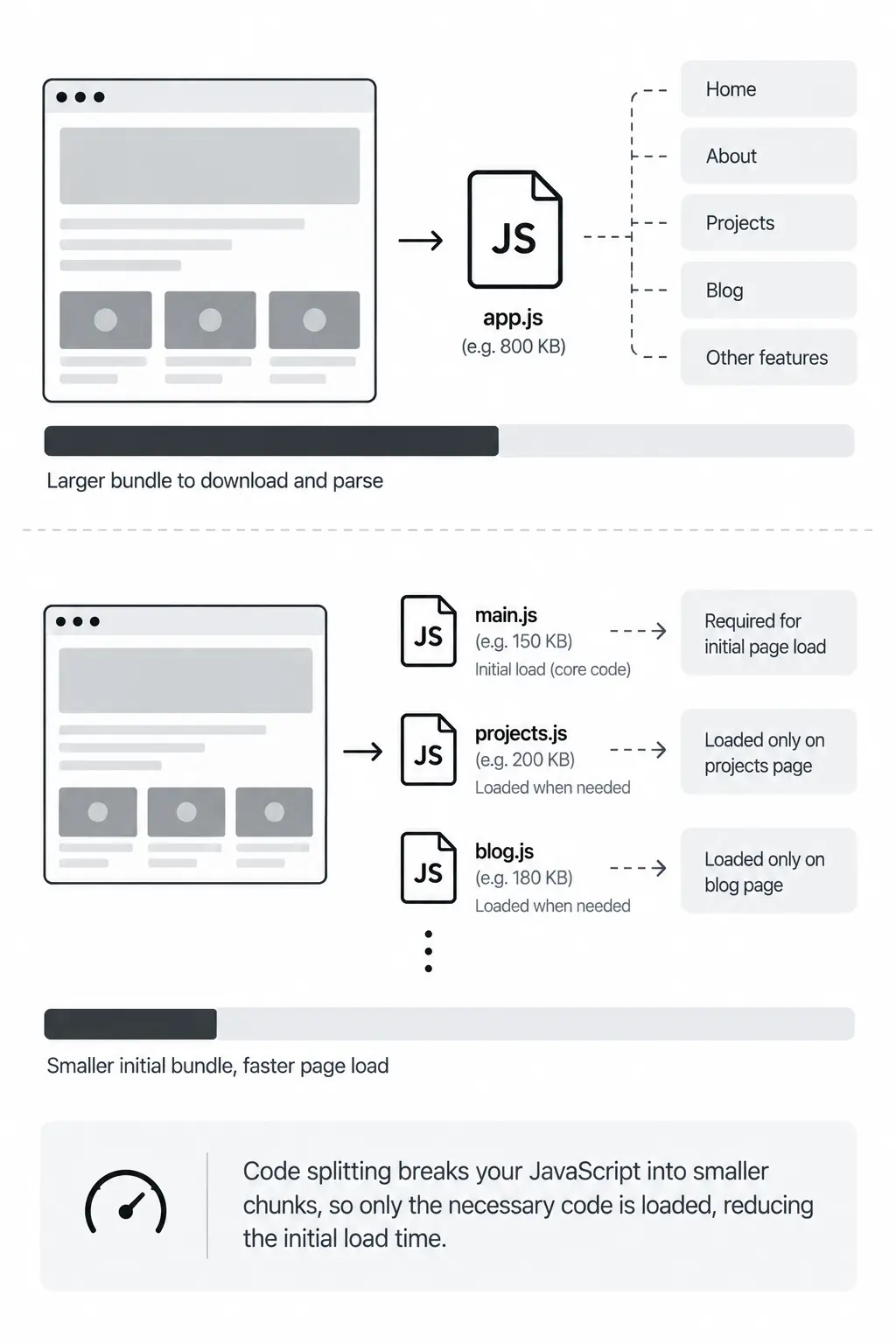
Optimizing when JavaScript executes helps, but reducing how much JavaScript we initially send can have an even bigger impact.
Code splitting divides the application into smaller chunks so users only download the code they currently need.
Instead of:
Initial page → Entire application bundle
we move toward:
Initial page → Critical JavaScript
Later interaction/navigation → Additional JavaScript
Dynamic imports are one way to achieve this:
const module = await import("./heavy-feature.js");
Modern frameworks and bundlers also support route-level and component-level code splitting.
Less initial JavaScript means less code for the browser to download, parse, compile, and execute during the initial page load.
Optimize Images and Videos
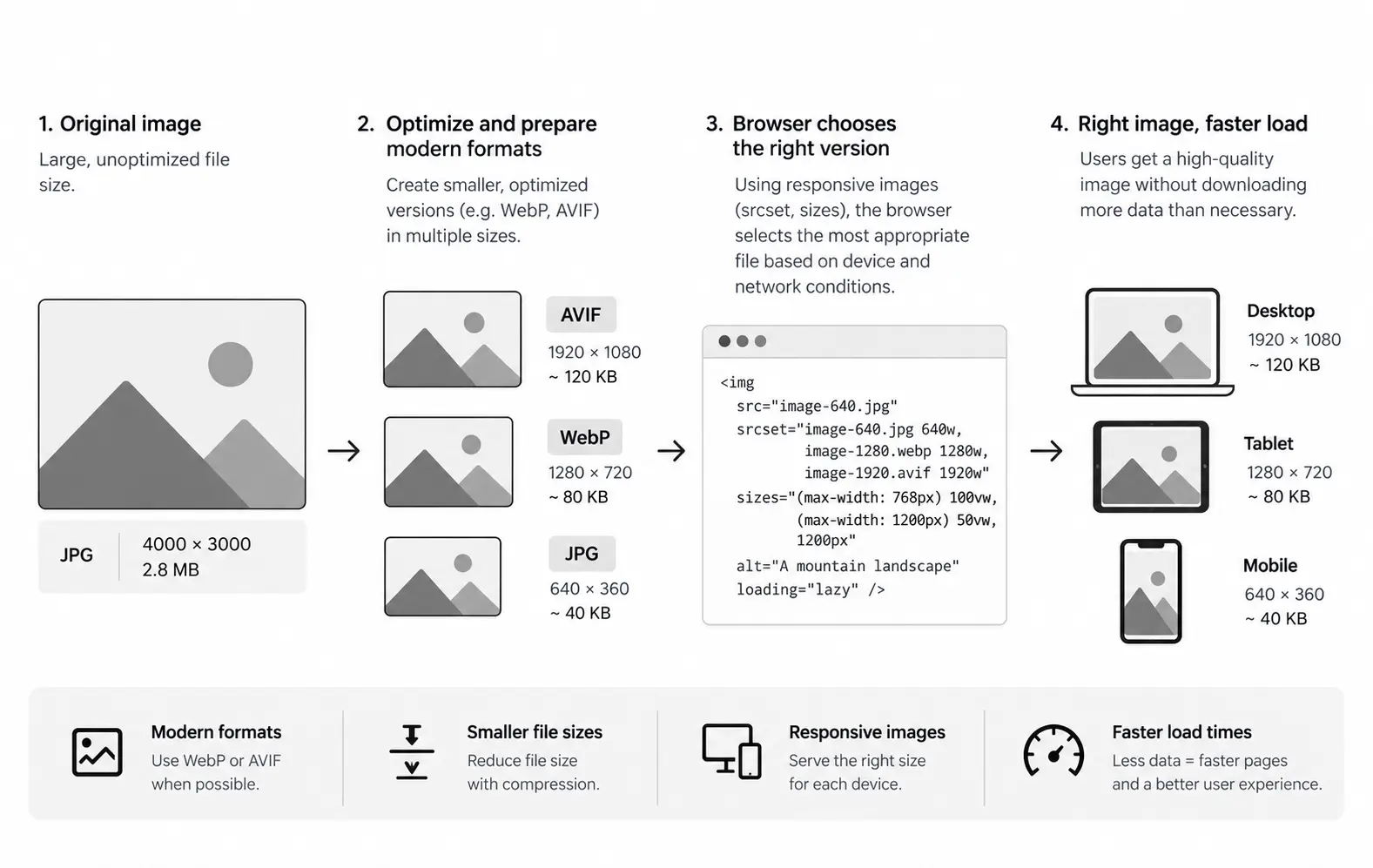
Images and videos are often among the largest resources on a page, so delivering them efficiently can significantly improve loading performance.
For images:
- Serve appropriately sized assets.
- Compress images effectively.
- Use modern formats such as WebP or AVIF where appropriate.
- Use responsive images for different viewport sizes.
- Lazy-load images outside the initial viewport.
<img
  src="/hero-1200.webp"
  srcset="/hero-600.webp 600w, /hero-1200.webp 1200w"
  sizes="100vw"
  alt="..."
/>
For videos, avoid downloading large media during the initial load unless it's essential to the experience. A lightweight poster image can provide a visual while the video loads when needed.
The principle is simple: prioritize media the user can see now and delay what they don't need yet.
Prepare for What the User Might Need Next
Once the current page is optimized, we can prepare for resources or pages the user is likely to need next.
Prefetchingprefetch provides a hint that a resource may be needed for a future navigation, allowing the browser to fetch it ahead of time when appropriate.
<link rel="prefetch" href="/next-page.js" />
A useful distinction is:
Preload → Needed for the current page.
Prefetch → Might be needed later.
Prerendering goes further by preparing a likely future page before the user navigates to it, potentially making the navigation feel much faster.
Both techniques should be used selectively. Prefetching or prerendering something the user never visits consumes resources without providing a benefit.
The key is to optimize for likely next actions, rather than trying to prepare everything in advance.
Measure Again
After applying the optimizations, run the page through PageSpeed Insights again and compare it with your original baseline.
Look beyond the overall performance score and check whether:
- FCP and LCP have improved.
- Render-blocking work has decreased.
- The initial JavaScript payload is smaller.
- Non-critical resources load later.
- The network waterfall shows a better loading sequence.
Not every optimization will produce a noticeable improvement.
Performance work is about identifying a bottleneck, making a targeted change, and measuring whether it actually helped.
Putting It All Together
Optimizing the Critical Rendering Path isn't about applying every performance technique available. It's about helping the browser prioritize the work that matters for the initial render.
Start by measuring the page, identifying what's delaying it, and making targeted improvements — whether that's deferring JavaScript, prioritizing critical resources, lazy-loading offscreen content, or reducing the amount of code shipped initially.
Then measure again.
The goal is simple: load what the user needs now, delay what can wait, and prepare for what's likely to come next.
On this page
- Introduction
- Start With Measurement
- Reduce Render-Blocking CSS
- Load JavaScript Without Unnecessarily Blocking Parsing
- Help the Browser Discover Important Resources Earlier
- Delay Resources the User Doesn't Need Yet
- Reduce the JavaScript Required for the Initial Page
- Optimize Images and Videos
- Prepare for What the User Might Need Next
- Measure Again
- Putting It All Together
Author
Farhan Halai
Topics
Share