CSS Performance Optimization: Practical Techniques to Improve Page Load
Introduction
CSS controls how a web page looks, but it also affects how quickly a browser can display that page.
Large stylesheets, unused CSS, and styles that take too long to load can delay rendering. Some CSS changes can also make the browser do extra work when updating the page.
Improving CSS performance is not just about writing fewer lines of code. It's about loading the right styles at the right time and avoiding unnecessary work in the browser.
In this guide, we'll look at practical ways to make CSS more efficient and improve page loading and rendering performance.
CSS Rendering Pipeline
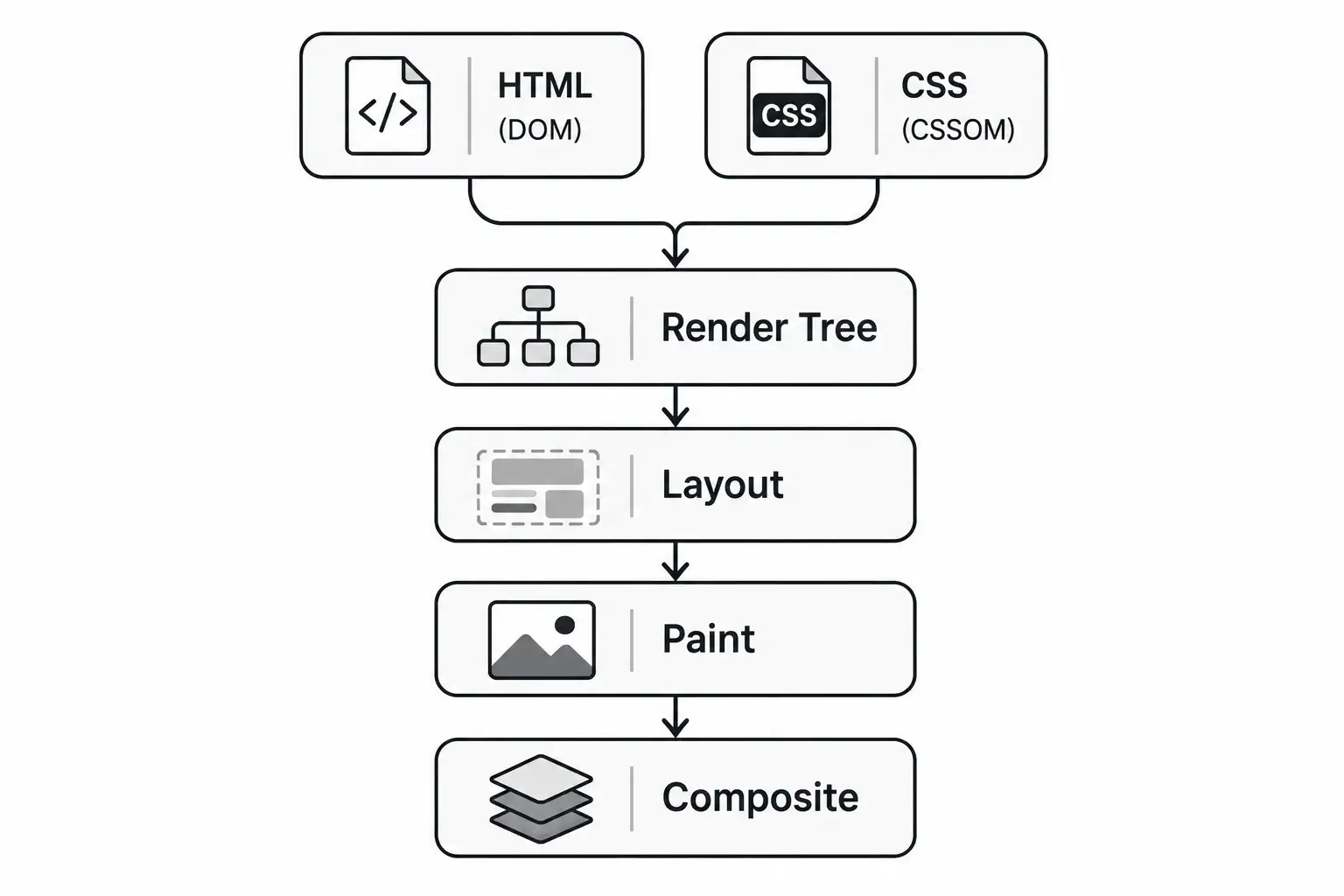
When a browser loads a page, it parses HTML to build the Document Object Model (DOM) and processes CSS to build the CSS Object Model (CSSOM).
The browser combines these two structures to create the render tree, which contains the elements and styles needed to display the page. It then calculates element positions and dimensions (layout), paints their visual properties, and composites the resulting layers to display the page.
External stylesheets are render-blocking by default when their media conditions match. The browser needs to download and process them before rendering content that depends on those styles. Large or slow stylesheets can delay initial rendering and affect metrics such as First Contentful Paint (FCP) and Largest Contentful Paint (LCP).
This is an important part of the Critical Rendering Path, which I've explored in more detail in a separate article.
Reduce CSS Payload Size
The amount of CSS a browser needs to download and process can affect how quickly a page renders. Reducing unnecessary CSS helps keep stylesheets smaller and improves delivery efficiency.
Remove Unused CSS
As applications grow, stylesheets often accumulate rules that are no longer used. These rules increase stylesheet size without contributing to the rendered page.
Use Chrome DevTools' Coverage panel to identify unused CSS. Review the results across different routes and interaction states before removing rules, as some styles may only be needed in specific situations.
Minify CSS
Minification removes unnecessary characters such as whitespace, comments, and formatting without changing how styles behave.
Most modern build tools support CSS minification as part of the production build. Ensure it is enabled to reduce the amount of CSS transferred to users.
Avoid Duplicated Styles
Repeated declarations and overlapping rules can make stylesheets unnecessarily large and harder to maintain.
Consolidate shared styles where appropriate, and remove outdated or redundant declarations. This keeps stylesheets easier to maintain and reduces unnecessary CSS.
Optimize CSS Delivery
How CSS is delivered to the browser is just as important as how much CSS is delivered. Prioritizing critical styles and loading non-critical styles efficiently can help reduce rendering delays.
Inline Critical CSS
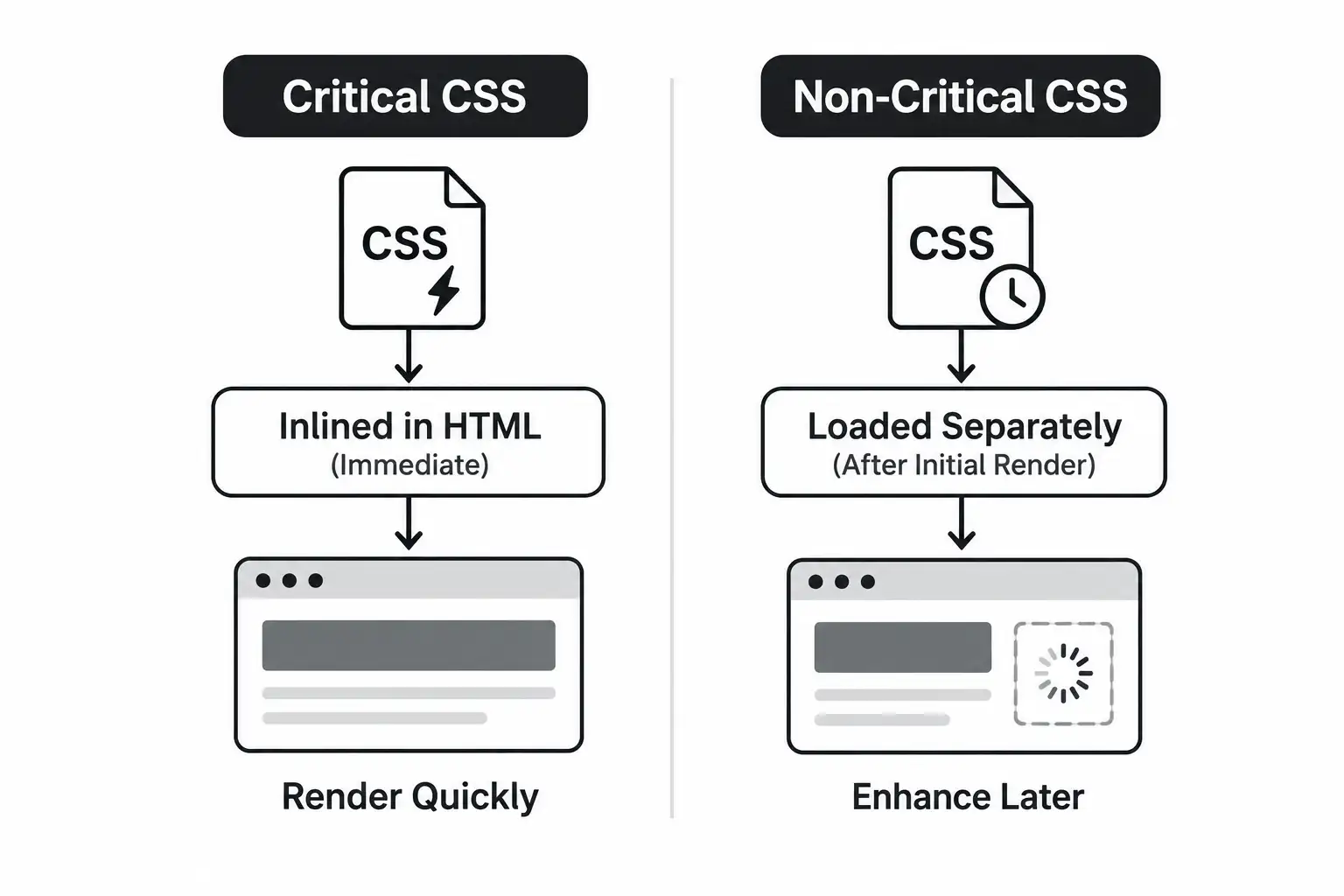
Critical CSS includes the styles required to render the visible portion of a page. Inline these styles in the HTML to make them available without waiting for an additional stylesheet request.
Keep the inline CSS small, as excessive styles can increase HTML size and reduce caching efficiency.
Load Non-Critical CSS Efficiently
Styles that aren't needed for the initial viewport can be loaded separately to avoid delaying initial rendering.
For example, you can preload a stylesheet and apply it once it has loaded:
<link
  rel="preload"
  href="/styles.css"
  as="style"
  onload="this.onload=null;this.rel='stylesheet'"
/>
Use this approach carefully, as delayed styles can cause a flash of unstyled content (FOUC). Always ensure that essential styles are available immediately.
Split CSS Where Appropriate
For larger applications, consider splitting CSS by route or component so users don't have to download styles they don't need. Use your build tooling to manage these bundles and avoid creating too many small requests.
Minimize Unnecessary Style Recalculations
Whenever the DOM or CSS changes, the browser may need to recalculate styles to determine how those changes affect the page.
Frequent or unnecessary updates can increase rendering work, particularly when they affect many elements.
Avoid Unnecessary DOM and Style Updates
Avoid repeatedly changing styles or DOM properties when a single update can achieve the same result. Batch related DOM writes together and avoid interleaving layout reads with style updates, which can force synchronous layout calculations.
For example, use CSS classes to apply a group of related styles instead of updating multiple inline style properties individually.
element.classList.add("is-active");
Keep Style Changes Scoped
Prefer component-level or scoped styles where appropriate. This helps keep styles predictable and reduces unintended effects across unrelated parts of the page.
Avoid overly broad selectors when they make styles difficult to maintain or cause unexpected elements to be affected.
Minimize Layout and Paint Work
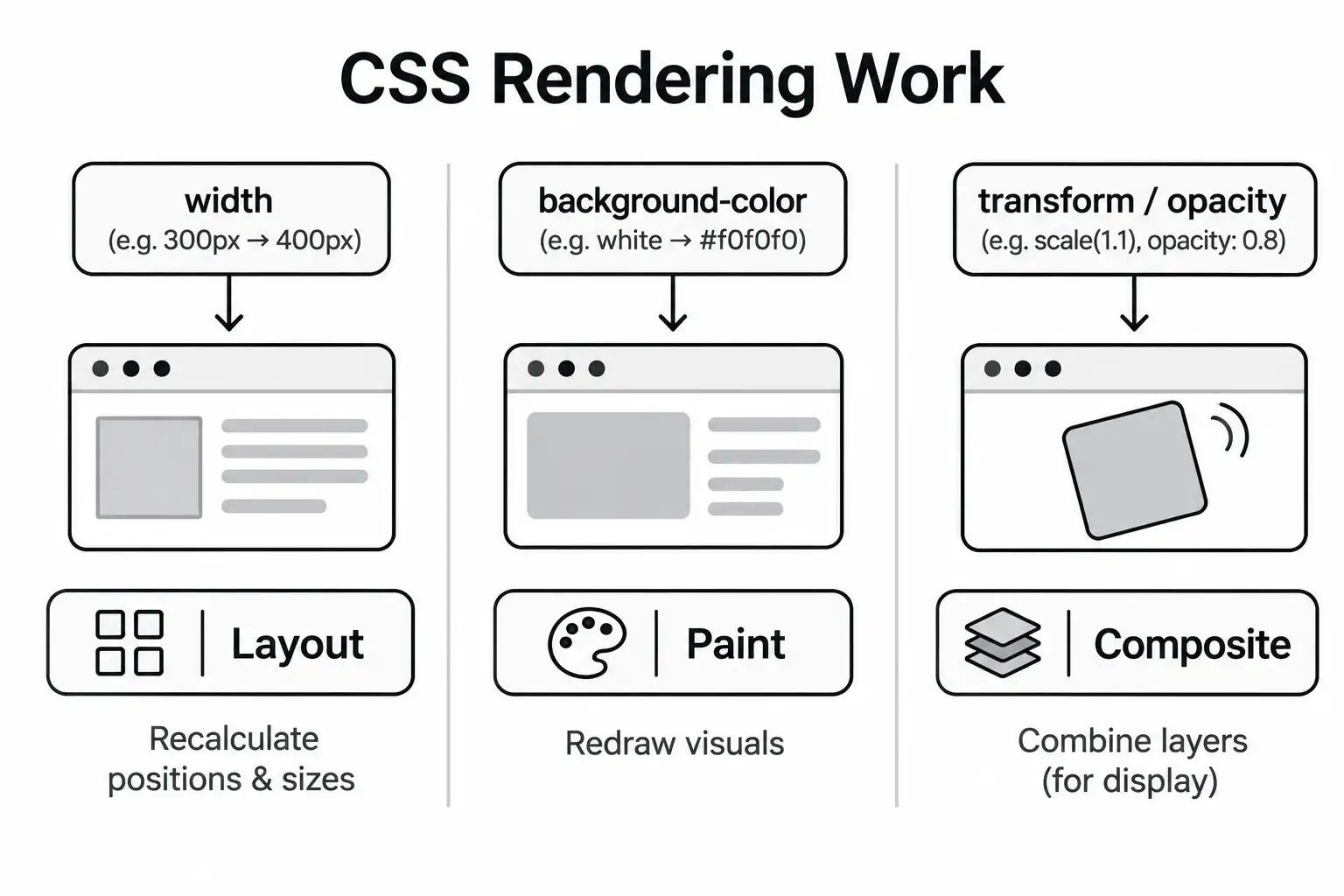
Changes to certain CSS properties can trigger layout or paint, requiring the browser to do additional rendering work.
For example, changing properties such as width, height, top, or left can trigger layout. Properties such as background-color, border-color, and box-shadow can trigger paint.
Prefer Efficient CSS Properties
When animating or updating elements, prefer transform and opacity where appropriate. These properties can often be handled by the compositor without triggering layout or paint.
Use Content Visibility
For pages with large amounts of content, content-visibility: auto allows the browser to skip rendering work for off-screen sections until they're needed.
.content-section {
  content-visibility: auto;
  contain-intrinsic-size: auto 500px;
}
This can reduce initial rendering work, particularly on long pages. The intrinsic size provides an estimated space for sections that haven't been rendered yet, helping avoid unexpected layout shifts.
Optimize CSS Animations and Transitions
Animations and transitions can make interfaces feel more responsive, but poorly optimized animations can increase rendering work and affect smoothness.
Animate Efficient Properties
Prefer transform and opacity for animations where possible. These properties can often be handled by the compositor, avoiding repeated layout and paint operations.
For example, instead of animating an element's position using left, use transform: translateX().
/* Avoid */
.box {
  transition: left 0.3s ease;
}

/* Prefer */
.box {
  transition: transform 0.3s ease;
}

.box:hover {
  transform: translateX(20px);
}
Use will-change Carefully
The will-change property can help browsers prepare for upcoming changes to an element. However, applying it unnecessarily can consume additional memory and create too many compositor layers.
Use it only when performance profiling identifies a need, and remove it when the animation is no longer required.
Measure and Debug CSS Performance
CSS optimization should be guided by measurements rather than assumptions. Browser developer tools can help identify unused styles, rendering bottlenecks, and opportunities for improvement.
Identify Unused CSS
Use the Coverage panel in Chrome DevTools to find CSS that isn't used during a page load or interaction. Review multiple routes and states before removing any styles.
Analyze Rendering Performance
Use the Performance panel to record page activity and inspect events such as Recalculate Style, Layout, and Paint. These help identify when CSS changes trigger additional rendering work.
Track Core Web Vitals
Use Lighthouse and PageSpeed Insights to evaluate page performance. Pay particular attention to metrics such as LCP and INP, and compare results before and after making changes.
Combine lab measurements with real-user data from the Chrome UX Report (CrUX) and Google Search Console's Core Web Vitals report to understand how optimizations affect actual visitors.
Conclusion
CSS performance is an important part of building fast and responsive web experiences. Reducing unnecessary styles, prioritizing critical CSS, and minimizing layout and paint work can help browsers render pages more efficiently.
However, optimization should always be driven by measurement. Use browser developer tools and real-user performance data to identify bottlenecks and validate improvements.
Rather than applying every technique blindly, focus on the changes that have the greatest impact on your users and the overall rendering experience.
On this page
Author
Farhan Halai
Topics
Share