How to Reduce JavaScript Bundle Size: A Practical Guide
Introduction
A growing JavaScript bundle isn't necessarily a sign of poor engineering. As applications evolve, new features and dependencies naturally add more JavaScript. The problem begins when we lose visibility into what we're shipping and why.
When GoDaddy analyzed its JavaScript bundle, it found that external dependencies contributed significantly to its size. By loading those dependencies on demand, it reduced its common JavaScript bundle from over 200 KB to around 90 KB minified.
Rather than applying optimizations blindly, we need to understand what's contributing to bundle size and whether that JavaScript is needed immediately.
In this article, we'll use Webpack and a small dashboard application to measure a bundle, identify unnecessary JavaScript, and make targeted improvements.
What is a JavaScript Bundle?
A frontend application is typically made up of modules that depend on other application code and third-party packages.
For example, our dashboard might import a utility and a chart:
// dashboard.js

import renderChart from "./chart";
The chart introduces another dependency:
// chart.js

import Chart from "chart.js/auto";

export default function renderChart() {
    // Render the chart...
}
Together, these relationships form a dependency graph:
index.js
  |- dashboard.js
        |- chart.js (local module)
              |- chart.js/auto (npm package)
Webpack follows this graph from an entry point and processes the dependencies into JavaScript bundles that can be delivered to the browser.
Importantly, a dependency can bring more than the code we write around it. It may also introduce substantial library code and additional dependencies.
Modern bundlers can split this JavaScript into multiple chunks, allowing some code to load initially and other parts to be fetched later. This makes both how much JavaScript we ship and when we ship it important.
Why Does Bundle Size Matter?
JavaScript has a cost beyond its download size. Once it reaches the browser, it still needs to be parsed, compiled, and executed.
That introduces two primary costs:
Network cost — Larger bundles require more data to be transferred, particularly affecting users on slower or unreliable connections.
Processing cost — Parsing, compiling, and executing JavaScript consumes device resources and can occupy the main thread, delaying rendering and user interactions.
These costs are more noticeable on lower-powered devices, where JavaScript that runs quickly on a development machine may take considerably longer.
The goal isn't to minimize JavaScript at all costs. It's to avoid loading code before users need it—and avoid shipping code they may never use.
Measure Before You Optimize
Before making changes, we need a baseline to understand what we're shipping.
Consider a small dashboard with a chart that users can open on demand. The chart uses Chart.js:
import Chart from "chart.js/auto";

export default function renderChart() {
  const canvas = document.querySelector("#chart");

  new Chart(canvas, {
    type: "line",
    // Chart configuration...
  });
}
The dashboard initially imports the chart module upfront:
import renderChart from "./chart";

export default function Dashboard() {
  const button = document.querySelector("#show-chart");

  button.addEventListener("click", renderChart);
}
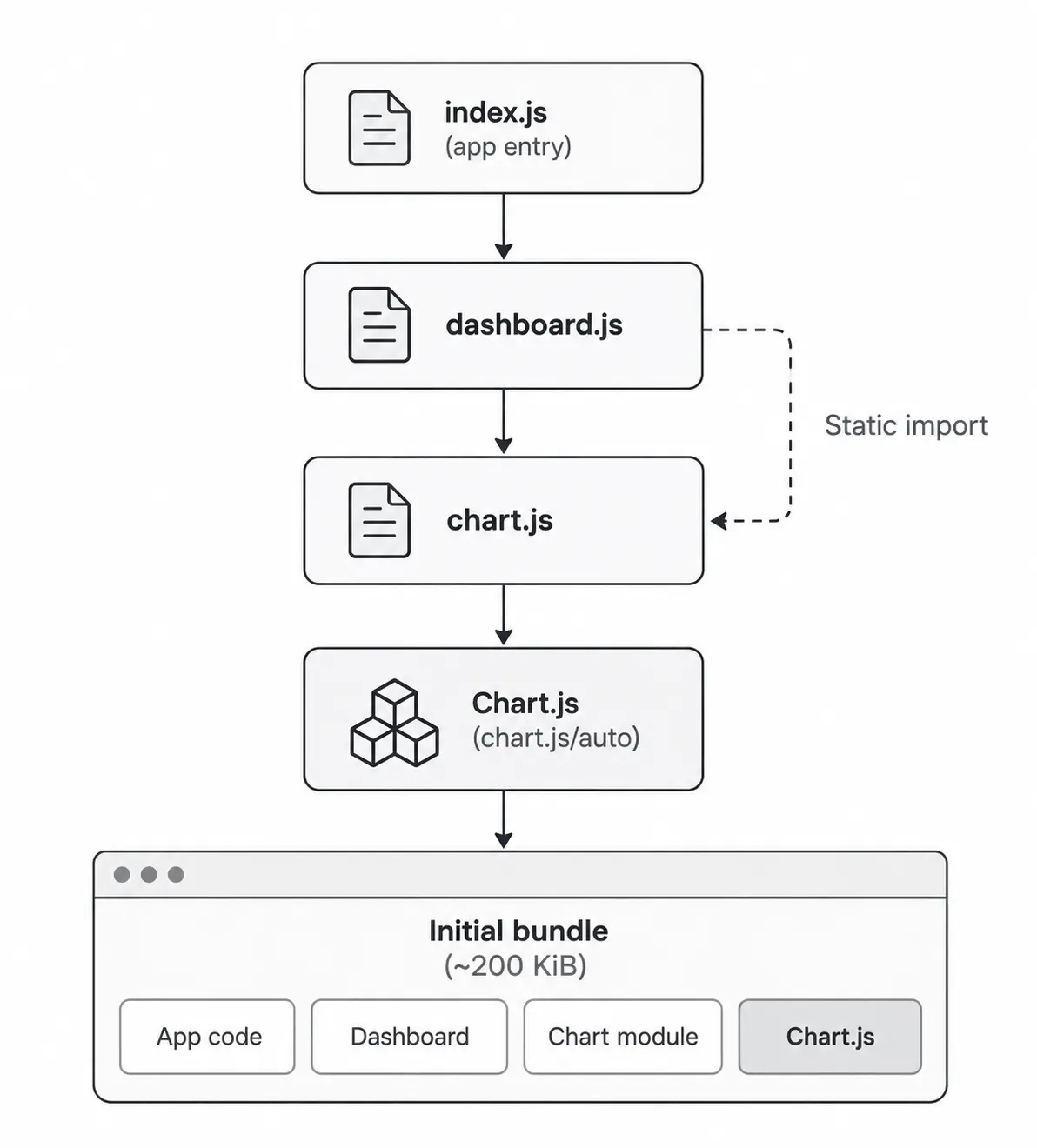
Although the chart appears only after user interaction, the static import includes Chart.js in the initial dependency graph.
Let's inspect the production build:
npm run build
Initial JavaScript: 200 KiB
Inspecting the bundle confirms that Chart.js accounts for the vast majority of that JavaScript. The dependency itself isn't necessarily the problem—the timing is. We're loading and processing it before the feature is needed.
That gives us a more useful question than simply asking how to make the bundle smaller:
Does this JavaScript need to be part of the initial load at all?
For this feature, the answer is no. The chart is only required after the user clicks the button, so our first optimization should focus on deferring that JavaScript until it's actually needed.
Reduce Initial JavaScript with Code Splitting
Our measurement showed that Chart.js accounts for most of the initial JavaScript, even though the chart isn't needed immediately.
Instead, we can load it dynamically when the user requests the feature:
export default function Dashboard() {
  const button = document.querySelector("#show-chart");

  button.addEventListener("click", showChart);
}

async function showChart() {
  const { default: renderChart } = await import("./chart");
  renderChart();
}
Dynamic import() creates a split point. Webpack can now move the chart-related code out of the initial bundle and into deferred chunks that are downloaded when the user requests the feature.
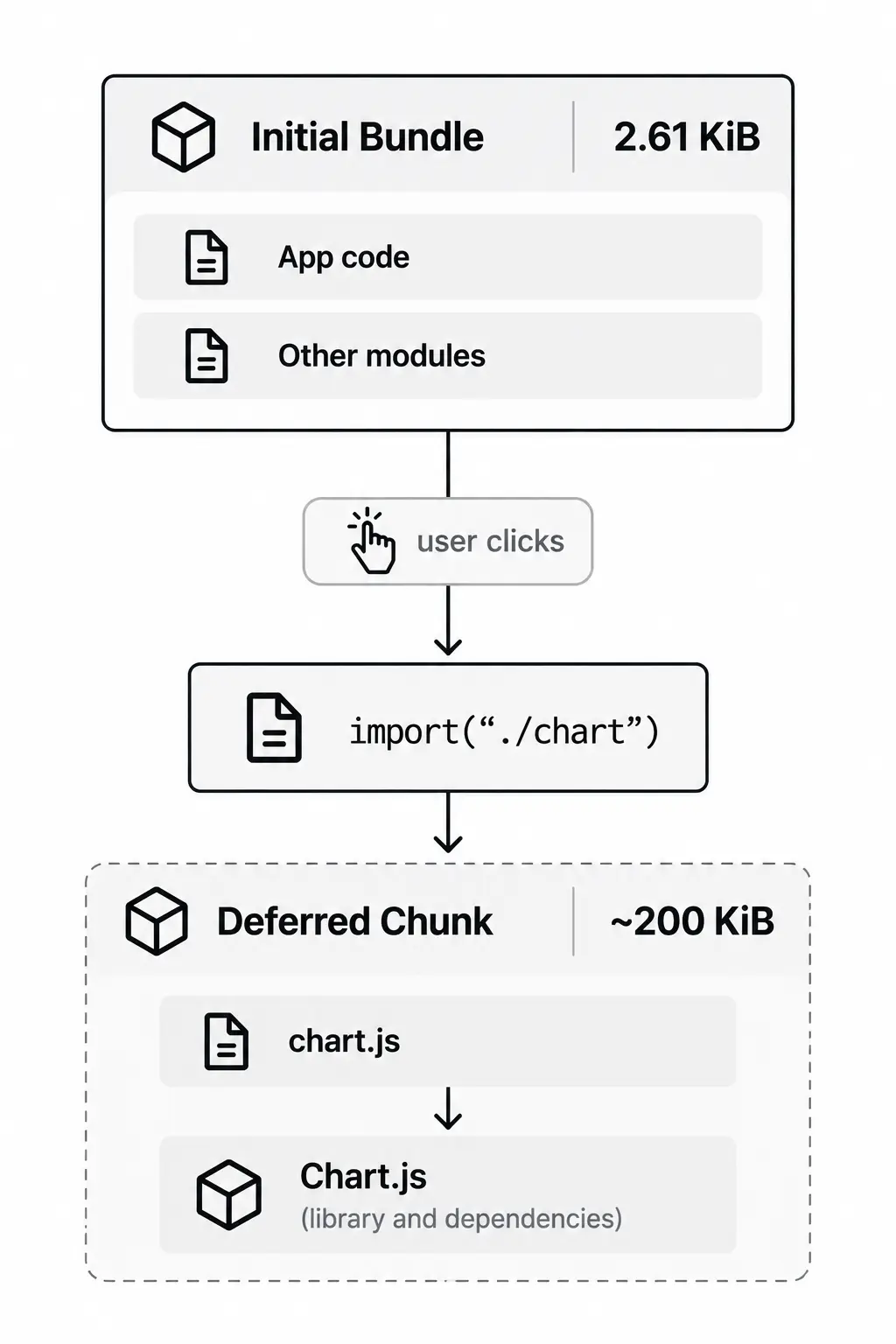
Running the same production build again gives us a very different initial payload:
Initial JavaScript: 2.61 KiB
The Chart.js vendor chunk is still approximately 200 KiB. We haven't made Chart.js smaller—we've changed when the browser downloads it.
In this deliberately small application, that reduces the initial JavaScript from 200 KiB to 2.61 KiB, a reduction of roughly 98.7%. The percentage is unusually large because Chart.js dominates such a minimal bundle, but the underlying principle applies to much larger applications as well.
Code splitting doesn't necessarily reduce total JavaScript. It changes when that JavaScript is downloaded, keeping unnecessary code out of the initial load.
Reduce Unused JavaScript with Tree Shaking
Code splitting changed when the chart code is loaded, but it didn't reduce the size of Chart.js itself. The deferred Chart.js vendor chunk is still approximately 200 KiB.
The next question is whether we actually need everything that we're importing.
Our chart currently uses the convenience entry point:
import Chart from "chart.js/auto";
chart.js/auto automatically registers the components Chart.js supports. That's convenient, but our application only needs a small subset of them for a line chart.
Instead, we can import and register only the components the chart requires:
import {
  Chart,
  LineController,
  LineElement,
  PointElement,
  LinearScale,
  CategoryScale,
} from "chart.js";

Chart.register(
  LineController,
  LineElement,
  PointElement,
  LinearScale,
  CategoryScale,
);
This gives Webpack a clearer opportunity to eliminate unused exports from the production output.
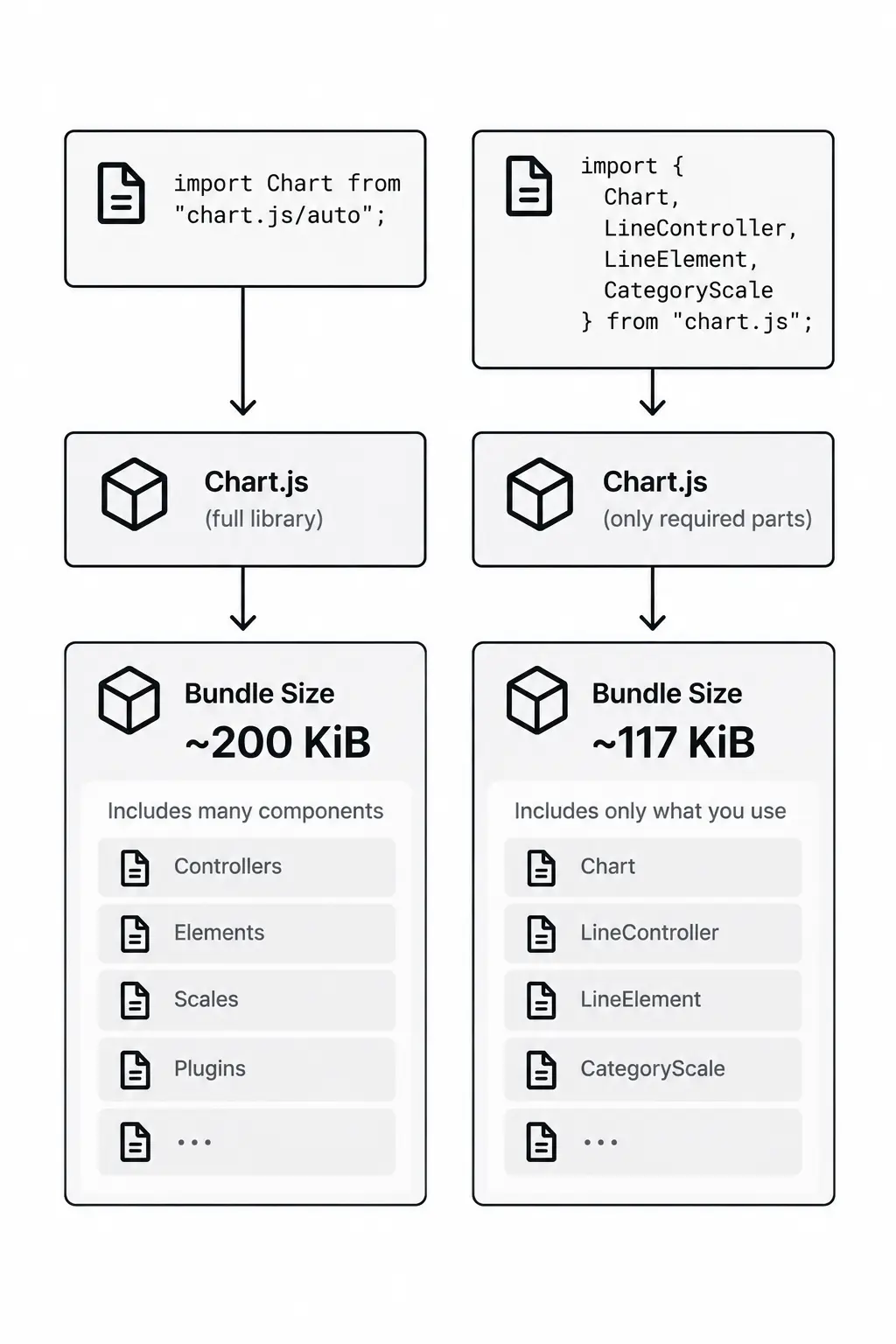
Running the production build again confirms the difference:
Initial JavaScript: 2.61 KiB
Deferred Chart.js vendor chunk: 117 KiB
The initial bundle remains unchanged because Chart.js is still loaded on demand. But the deferred vendor chunk has dropped from approximately 200 KiB to 117 KiB—a reduction of roughly 41.5%.
This highlights an important distinction between the two optimizations:
Code splitting asks: When does the application need this code?
Tree shaking asks: How much of this code does the application actually use?
One changes the loading boundary; the other reduces unnecessary code within that boundary.
Tree shaking isn't something we should assume is working simply because we're using ES modules or selective imports. Its effectiveness depends on how a package is structured and what the bundler can safely eliminate.
The production build should confirm whether the optimization actually reduced the JavaScript being shipped.
Watch Your Dependencies
Third-party dependencies can become significant contributors to bundle size. That doesn't make them inherently problematic—a mature library may save considerable development and maintenance effort.
Before introducing a dependency, consider:
- How much JavaScript does it add?
- How much of its functionality will we use?
- Can we import only the features we need?
- Does it need to load during the initial experience?
Bundle size is one part of a broader trade-off involving functionality, maintainability, reliability, and development effort.
The goal is to make dependency costs visible and intentional, rather than discovering them only after the bundle grows.
Measure Again: What Did We Improve?
We started with 200 KiB of initial JavaScript, with Chart.js accounting for most of it.
After code splitting:
Initial JavaScript: 2.61 KiB
Deferred Chart.js vendor chunk: 200 KiB
We didn't reduce Chart.js itself—we moved it out of the initial load.
After switching to selective imports:
Initial JavaScript: 2.61 KiB
Deferred Chart.js vendor chunk: 117 KiB
The two optimizations addressed different problems: code splitting changed when the JavaScript was loaded, while selective imports and tree shaking reduced how much of it we shipped.
Explore the source code: The complete Webpack example is available on GitHub if you'd like to explore the implementation and experiment with the optimizations yourself.
The exact numbers are specific to this deliberately small example, but the process scales beyond it:
Measure → Investigate → Optimize → Measure Again
The goal isn't to produce the smallest possible bundle. It's to understand what we're shipping, when the browser needs it, and whether that cost is justified.
Start with the bundle. Measure it, understand what's driving it, and optimize based on what the data shows.
On this page
Author
Farhan Halai
Topics
Share